The Win26 project: Improve Windows 11 for 2026 and beyond
The Issue
For decades, Windows has been defined by a balance of innovation, practicality, and user choice. But recent decisions, especially in Windows 11, have moved the operating system away from the features, design principles, and freedoms that made Windows unique. Beloved ideas have been removed, modern conveniences are missing, and new additions often feel forced rather than helpful. This petition calls on Microsoft to restore what worked, fix what doesn’t, and modernize Windows in ways that respect users instead of overriding them.
Our goal is simple, a Windows that feels modern without abandoning its strengths, and a Windows that evolves without ignoring the needs of the people who use it every day. This petition outlines both the features from past versions that deserve to return and the new improvements that would bring Windows into a truly modern era. These proposed changes will be provided in two parts. Part One will detail old features that should be brought back, and Part Two will show new features that should be added to Windows 11 and later versions.
Part One: Blast from the Past
1. Live Tiles
Live Tiles arrived with Windows 8, and while the full‑screen Start screen was controversial, the underlying idea was brilliant: a Start menu that wasn’t just a launcher, but an information surface. Windows 10 refined this concept by restoring a compact Start menu and placing Live Tiles on the right side, alongside the traditional app list on the left.
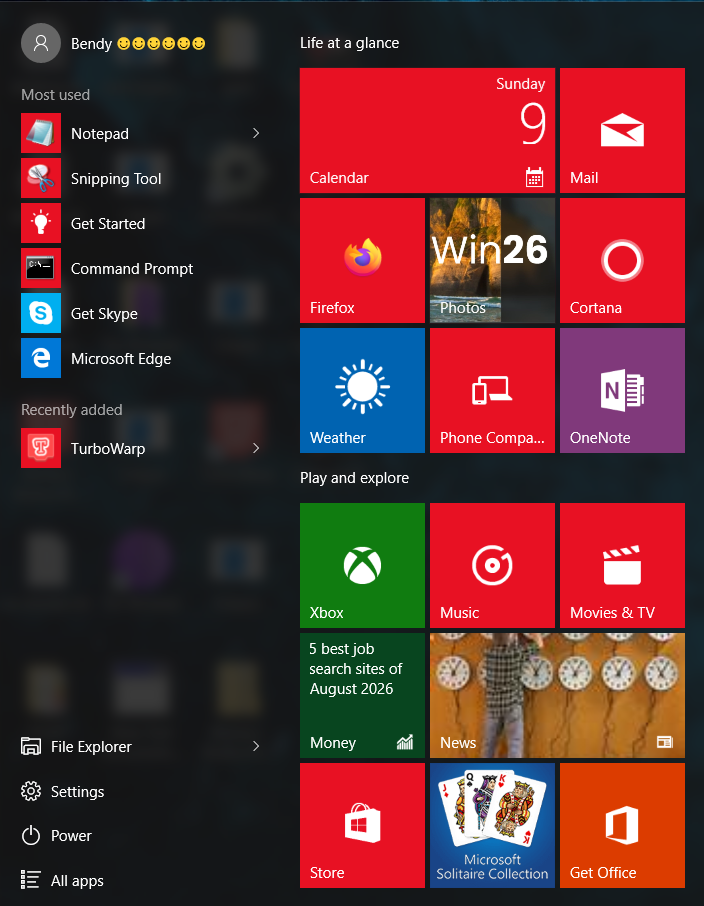
This wasn’t the static Start menu Windows had used for decades. It was dynamic, glanceable, and genuinely useful. Live Tiles updated every few seconds, showing real‑time information from apps without requiring the user to open them. Weather, mail previews, calendar events, news headlines, stock tickers, all available at a glance.
Live Tiles solved a real problem: needing to open full applications just to check a single piece of information. They made Windows feel alive, personal, and efficient. Removing them in Windows 11 stripped away one of the most innovative UI ideas Microsoft ever shipped.
We are calling on Microsoft to restore Live Tiles as an optional feature for users who value a Start menu that works for them, not just as a static grid of icons.
2. Proper Transparency Effects
Windows 11’s transparency system, known as Mica, is not true transparency. Instead of showing what is actually behind a window, Mica simply displays a blurred version of the desktop wallpaper. This removes depth, reduces spatial awareness, and makes the interface feel flatter and more artificial.
Windows 10’s Acrylic effect (introduced in version 1709) was closer to real transparency, but still limited, it only applied to the active window and was heavily blurred. Earlier versions of Windows 10, however, used a much better approach: true transparency on the taskbar, Start menu, and taskbar flyouts. These effects showed the actual content behind the UI element, with just enough blur to maintain readability while still providing depth and modernity.
For users who never experienced pre‑1709 Windows 10, here is an example of the effect:
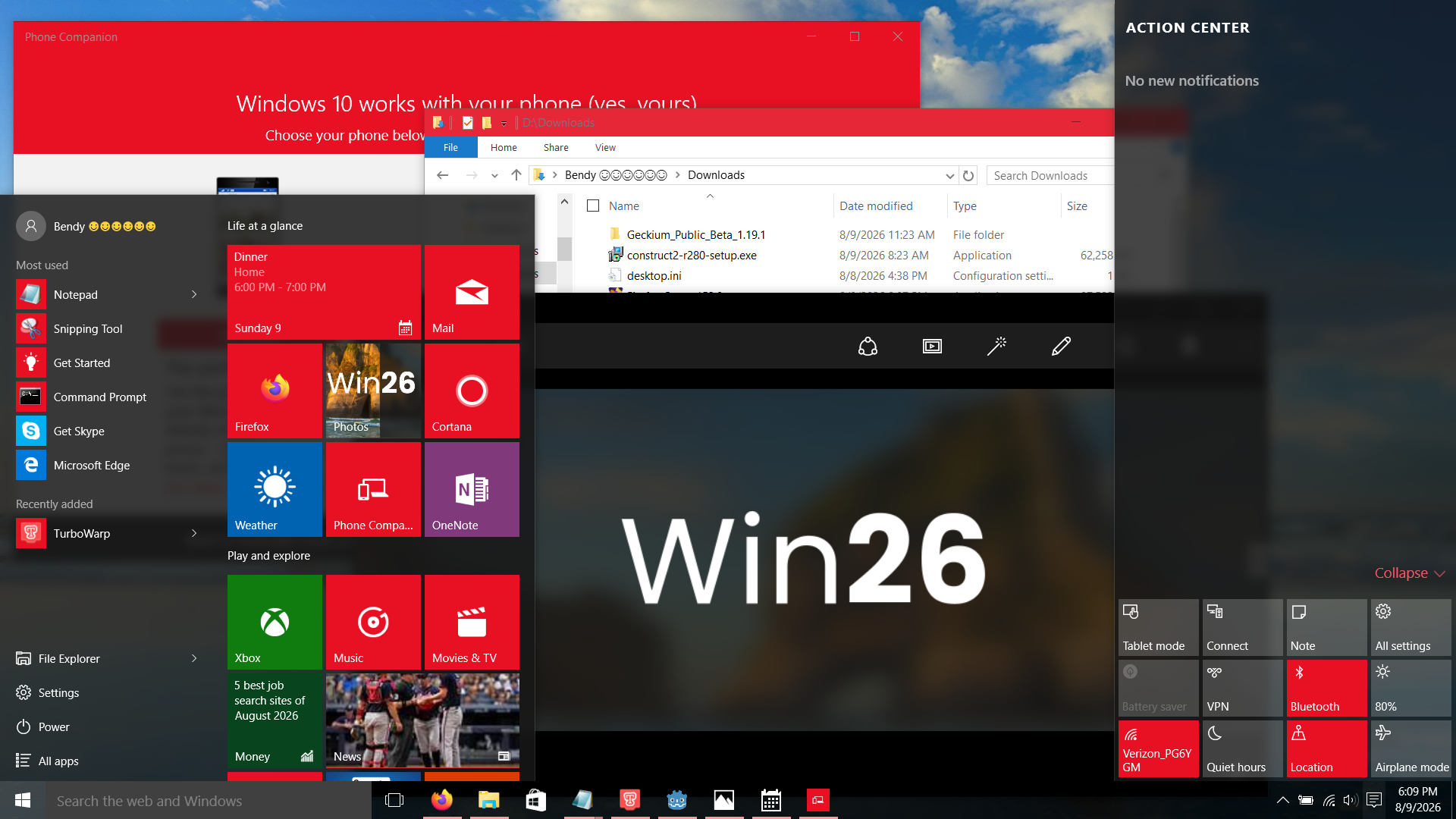
The Start menu, Action Center, and taskbar elements all used genuine transparency. It looked clean, modern, and readable, without drowning the interface in excessive blur.
Now compare this to Windows 11’s Mica (screenshot credit: pureinfotech.com):
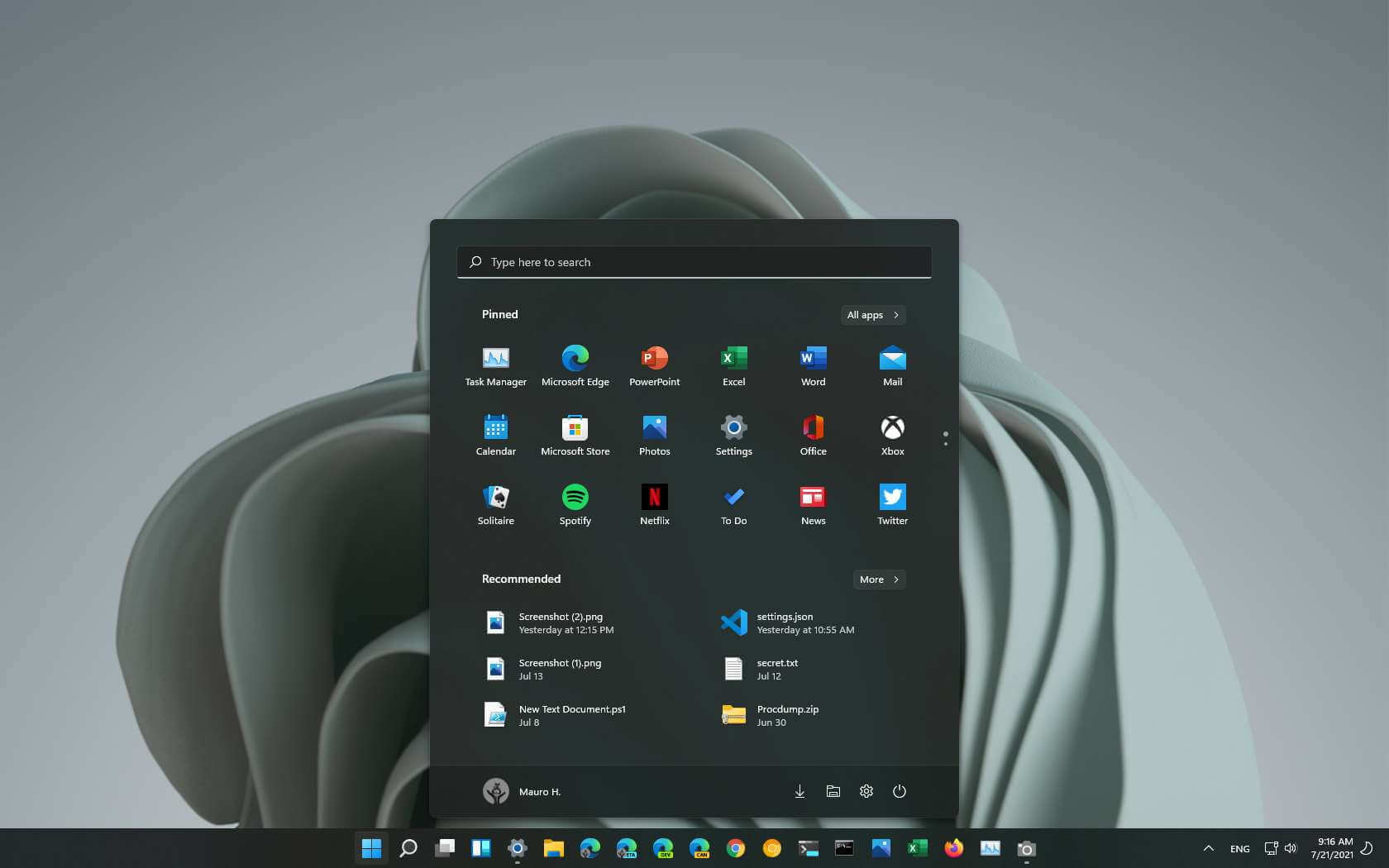
The interface looks washed out and bland. The wallpaper dominates the UI instead of subtly enhancing it.
Here is the same thing with a more colorful wallpaper (screenshot credit: wincert.net):
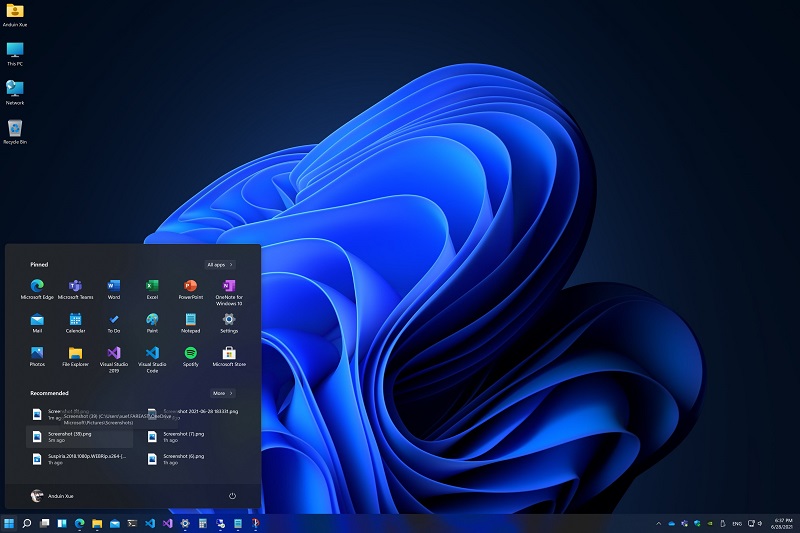
The problem becomes even more obvious. The heavy blur turns the UI into a watercolor smear, and readability suffers, icons near bright or saturated areas become difficult to distinguish.
We are calling for Microsoft to restore the pre‑1709 transparency system. It offered:
True depth
Better readability
A cleaner, more modern aesthetic
A transparency effect that actually reflected what was behind the UI
This was one of Windows 10’s most visually appealing design choices, and it deserves to return.
Part Two: Modernizing Windows
Windows 11 is supposed to represent the future of Windows, yet it lacks many quality‑of‑life features that modern operating systems already provide. Because these conveniences are missing, Windows often feels older than it actually is. To truly modernize the platform, Microsoft should introduce new, optional features that enhance productivity without compromising the classic Windows experience.
1. A Modern, Optional Top Bar
Windows would benefit greatly from an optional, macOS‑style top bar, not as a copy of macOS, but as a uniquely Windows feature designed around productivity and glanceable information.
This top bar should function like a large, thin, persistent Live Tile stretching across the top of the screen. Instead of being just a place for menus, it could surface important information from apps in real time. For example:
When you receive a login verification code via email, the code could appear instantly on the top bar, ready to paste with a single click.
If a stock you follow drops sharply, the bar could display an alert without interrupting your workflow.
Calendar events, weather updates, music controls, and other app‑driven information could appear contextually when needed.
The bar should also display the current app name and the system clock, while leaving the system tray exactly where users expect it, on the taskbar.
Most importantly, this feature must be fully optional. Users who prefer the traditional Windows layout should be able to disable it entirely, while those who want a more modern, information‑rich interface can enable it with a single toggle.
This approach preserves Windows’ identity while giving users a powerful new way to interact with their apps and information.
2. AI Should Be Useful, Not Intrusive
Windows 11 has become notorious for forcing AI into parts of the operating system where it doesn’t belong. Features like AI‑powered Notepad, AI‑enhanced Paint, Recall, and other additions feel unnecessary, intrusive, and out of place. Instead of improving the user experience, they often frustrate users and erode trust in the applications they once relied on. Windows 11 also forces you to have a Microsoft account during setup that is mainly used for tracking and AI
AI should only be used in areas where it genuinely makes sense, places where it enhances productivity, improves accessibility, or solves real problems. It should never be injected into core apps simply for the sake of marketing or trend‑chasing.
Most importantly, every AI feature must be fully optional. Users should be able to disable AI system‑wide without relying on third‑party tools, registry hacks, or hidden settings. AI should feel like an add‑on, not a mandatory part of the operating system’s foundation. Users should also be able to set up Windows without needing a Microsoft account or internet access.
When AI is forced into workflows where it isn’t needed, it becomes a distraction rather than a benefit. It undermines user confidence, clutters the interface, and makes Windows feel less stable and less predictable. By making AI optional, purposeful, and clearly separated from the core system, Microsoft can restore trust and ensure that Windows remains a platform that respects user choice.
3. A Modern App Framework
WinRT debuted with Windows 8 as a modern, secure, and efficient application framework. In many ways, it surpassed Win32, offering cleaner APIs, better performance characteristics, and a more consistent design language. But WinRT apps were held back by major limitations: they could only be installed through the Windows Store, they were locked into a tablet‑centric UI, and they were forced into full‑screen layouts that didn’t suit traditional PCs.
Windows 10 improved the situation with UWP, which built on WinRT while fixing many of its flaws. UWP apps ran in normal windows, used a more desktop‑friendly interface, and could be sideloaded without relying on the Store. UWP was a strong foundation — modern, efficient, and secure, but it still suffered from one critical limitation: sandboxing.
UWP apps were isolated from the system, unable to access many APIs and features that Win32 apps rely on. This improved security, but it also prevented developers from building powerful applications. And while Win32 apps could be packaged for the Store, they remained Win32 at their core, not true UWP.
To modernize Windows and create a unified, future‑proof app ecosystem, we are calling on Microsoft to take two major steps:
Step 1: Allow full system access for UWP apps through permissions. Just like UWP apps request access to location, microphone, or camera, they should be able to request elevated system permissions. This preserves the security benefits of sandboxing while enabling developers to build advanced, fully capable applications.
Step 2: Provide a real path to port Win32 apps to UWP. Developers should be able to convert Win32 applications into native UWP apps without workarounds, packaging tricks, or compatibility layers. A true migration path would allow existing software to adopt modern APIs, modern security, and modern UI, finally bringing UWP to the mainstream.
These changes would create a powerful, secure, and modern app platform for Windows, one that combines the strengths of WinRT/UWP with the flexibility developers expect from Win32. It would modernize the Windows ecosystem without sacrificing compatibility, performance, or user choice.
Windows has always been at its best when it embraces clarity, usefulness, and user control. The features outlined in this petition, from restoring Live Tiles and proper transparency effects to introducing a modern top bar, fixing the role of AI, and strengthening the app framework, are not nostalgic demands or unrealistic wish‑lists. They are practical, achievable improvements that would make Windows more powerful, more intuitive, and more enjoyable for millions of users.
Microsoft has the opportunity to refine Windows into an operating system that respects its history while confidently moving forward. By bringing back the features that worked and modernizing the areas that need attention, Windows can once again become a platform that feels both familiar and genuinely innovative.
We ask Microsoft to listen to its users, acknowledge what made Windows great, and take meaningful steps toward an operating system that reflects the needs of the people who rely on it every day.

7
The Issue
For decades, Windows has been defined by a balance of innovation, practicality, and user choice. But recent decisions, especially in Windows 11, have moved the operating system away from the features, design principles, and freedoms that made Windows unique. Beloved ideas have been removed, modern conveniences are missing, and new additions often feel forced rather than helpful. This petition calls on Microsoft to restore what worked, fix what doesn’t, and modernize Windows in ways that respect users instead of overriding them.
Our goal is simple, a Windows that feels modern without abandoning its strengths, and a Windows that evolves without ignoring the needs of the people who use it every day. This petition outlines both the features from past versions that deserve to return and the new improvements that would bring Windows into a truly modern era. These proposed changes will be provided in two parts. Part One will detail old features that should be brought back, and Part Two will show new features that should be added to Windows 11 and later versions.
Part One: Blast from the Past
1. Live Tiles
Live Tiles arrived with Windows 8, and while the full‑screen Start screen was controversial, the underlying idea was brilliant: a Start menu that wasn’t just a launcher, but an information surface. Windows 10 refined this concept by restoring a compact Start menu and placing Live Tiles on the right side, alongside the traditional app list on the left.
This wasn’t the static Start menu Windows had used for decades. It was dynamic, glanceable, and genuinely useful. Live Tiles updated every few seconds, showing real‑time information from apps without requiring the user to open them. Weather, mail previews, calendar events, news headlines, stock tickers, all available at a glance.
Live Tiles solved a real problem: needing to open full applications just to check a single piece of information. They made Windows feel alive, personal, and efficient. Removing them in Windows 11 stripped away one of the most innovative UI ideas Microsoft ever shipped.
We are calling on Microsoft to restore Live Tiles as an optional feature for users who value a Start menu that works for them, not just as a static grid of icons.
2. Proper Transparency Effects
Windows 11’s transparency system, known as Mica, is not true transparency. Instead of showing what is actually behind a window, Mica simply displays a blurred version of the desktop wallpaper. This removes depth, reduces spatial awareness, and makes the interface feel flatter and more artificial.
Windows 10’s Acrylic effect (introduced in version 1709) was closer to real transparency, but still limited, it only applied to the active window and was heavily blurred. Earlier versions of Windows 10, however, used a much better approach: true transparency on the taskbar, Start menu, and taskbar flyouts. These effects showed the actual content behind the UI element, with just enough blur to maintain readability while still providing depth and modernity.
For users who never experienced pre‑1709 Windows 10, here is an example of the effect:
The Start menu, Action Center, and taskbar elements all used genuine transparency. It looked clean, modern, and readable, without drowning the interface in excessive blur.
Now compare this to Windows 11’s Mica (screenshot credit: pureinfotech.com):
The interface looks washed out and bland. The wallpaper dominates the UI instead of subtly enhancing it.
Here is the same thing with a more colorful wallpaper (screenshot credit: wincert.net):
The problem becomes even more obvious. The heavy blur turns the UI into a watercolor smear, and readability suffers, icons near bright or saturated areas become difficult to distinguish.
We are calling for Microsoft to restore the pre‑1709 transparency system. It offered:
True depth
Better readability
A cleaner, more modern aesthetic
A transparency effect that actually reflected what was behind the UI
This was one of Windows 10’s most visually appealing design choices, and it deserves to return.
Part Two: Modernizing Windows
Windows 11 is supposed to represent the future of Windows, yet it lacks many quality‑of‑life features that modern operating systems already provide. Because these conveniences are missing, Windows often feels older than it actually is. To truly modernize the platform, Microsoft should introduce new, optional features that enhance productivity without compromising the classic Windows experience.
1. A Modern, Optional Top Bar
Windows would benefit greatly from an optional, macOS‑style top bar, not as a copy of macOS, but as a uniquely Windows feature designed around productivity and glanceable information.
This top bar should function like a large, thin, persistent Live Tile stretching across the top of the screen. Instead of being just a place for menus, it could surface important information from apps in real time. For example:
When you receive a login verification code via email, the code could appear instantly on the top bar, ready to paste with a single click.
If a stock you follow drops sharply, the bar could display an alert without interrupting your workflow.
Calendar events, weather updates, music controls, and other app‑driven information could appear contextually when needed.
The bar should also display the current app name and the system clock, while leaving the system tray exactly where users expect it, on the taskbar.
Most importantly, this feature must be fully optional. Users who prefer the traditional Windows layout should be able to disable it entirely, while those who want a more modern, information‑rich interface can enable it with a single toggle.
This approach preserves Windows’ identity while giving users a powerful new way to interact with their apps and information.
2. AI Should Be Useful, Not Intrusive
Windows 11 has become notorious for forcing AI into parts of the operating system where it doesn’t belong. Features like AI‑powered Notepad, AI‑enhanced Paint, Recall, and other additions feel unnecessary, intrusive, and out of place. Instead of improving the user experience, they often frustrate users and erode trust in the applications they once relied on. Windows 11 also forces you to have a Microsoft account during setup that is mainly used for tracking and AI
AI should only be used in areas where it genuinely makes sense, places where it enhances productivity, improves accessibility, or solves real problems. It should never be injected into core apps simply for the sake of marketing or trend‑chasing.
Most importantly, every AI feature must be fully optional. Users should be able to disable AI system‑wide without relying on third‑party tools, registry hacks, or hidden settings. AI should feel like an add‑on, not a mandatory part of the operating system’s foundation. Users should also be able to set up Windows without needing a Microsoft account or internet access.
When AI is forced into workflows where it isn’t needed, it becomes a distraction rather than a benefit. It undermines user confidence, clutters the interface, and makes Windows feel less stable and less predictable. By making AI optional, purposeful, and clearly separated from the core system, Microsoft can restore trust and ensure that Windows remains a platform that respects user choice.
3. A Modern App Framework
WinRT debuted with Windows 8 as a modern, secure, and efficient application framework. In many ways, it surpassed Win32, offering cleaner APIs, better performance characteristics, and a more consistent design language. But WinRT apps were held back by major limitations: they could only be installed through the Windows Store, they were locked into a tablet‑centric UI, and they were forced into full‑screen layouts that didn’t suit traditional PCs.
Windows 10 improved the situation with UWP, which built on WinRT while fixing many of its flaws. UWP apps ran in normal windows, used a more desktop‑friendly interface, and could be sideloaded without relying on the Store. UWP was a strong foundation — modern, efficient, and secure, but it still suffered from one critical limitation: sandboxing.
UWP apps were isolated from the system, unable to access many APIs and features that Win32 apps rely on. This improved security, but it also prevented developers from building powerful applications. And while Win32 apps could be packaged for the Store, they remained Win32 at their core, not true UWP.
To modernize Windows and create a unified, future‑proof app ecosystem, we are calling on Microsoft to take two major steps:
Step 1: Allow full system access for UWP apps through permissions. Just like UWP apps request access to location, microphone, or camera, they should be able to request elevated system permissions. This preserves the security benefits of sandboxing while enabling developers to build advanced, fully capable applications.
Step 2: Provide a real path to port Win32 apps to UWP. Developers should be able to convert Win32 applications into native UWP apps without workarounds, packaging tricks, or compatibility layers. A true migration path would allow existing software to adopt modern APIs, modern security, and modern UI, finally bringing UWP to the mainstream.
These changes would create a powerful, secure, and modern app platform for Windows, one that combines the strengths of WinRT/UWP with the flexibility developers expect from Win32. It would modernize the Windows ecosystem without sacrificing compatibility, performance, or user choice.
Windows has always been at its best when it embraces clarity, usefulness, and user control. The features outlined in this petition, from restoring Live Tiles and proper transparency effects to introducing a modern top bar, fixing the role of AI, and strengthening the app framework, are not nostalgic demands or unrealistic wish‑lists. They are practical, achievable improvements that would make Windows more powerful, more intuitive, and more enjoyable for millions of users.
Microsoft has the opportunity to refine Windows into an operating system that respects its history while confidently moving forward. By bringing back the features that worked and modernizing the areas that need attention, Windows can once again become a platform that feels both familiar and genuinely innovative.
We ask Microsoft to listen to its users, acknowledge what made Windows great, and take meaningful steps toward an operating system that reflects the needs of the people who rely on it every day.
The Decision Makers

Petition Updates
Share this petition
Petition created on August 9, 2026