
Pressure acer to fix their unstable and buggy nitrosense app for acer nitro users.
The Issue
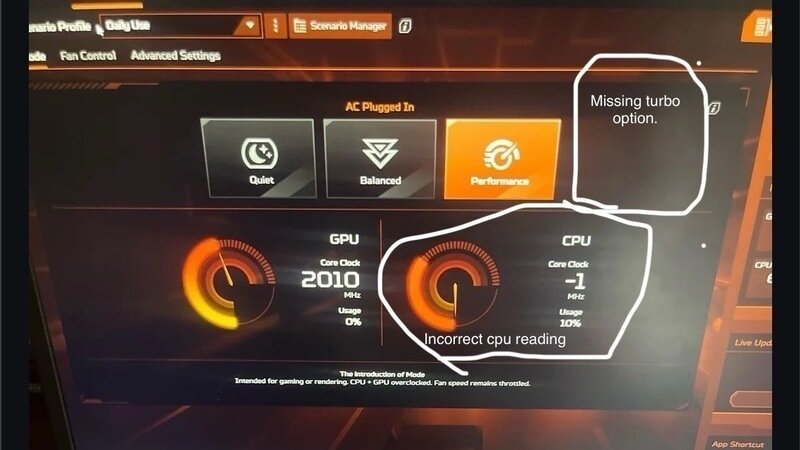
On my acer nitro v15, model number - Anv15-51, which I got about 2 months ago now has been working fine, but what has been really annoying with this laptop is a big feature of it, “Nitrosense”, I am on the latest version of this app availed for my model and there is just issues with the app that cannot be ignored. First of all, turbo mode is completely missing from the app, it shows up randomly and this a almost the case for all nitro users, meaning a literal feature of the laptop is unavailable due to this bug,
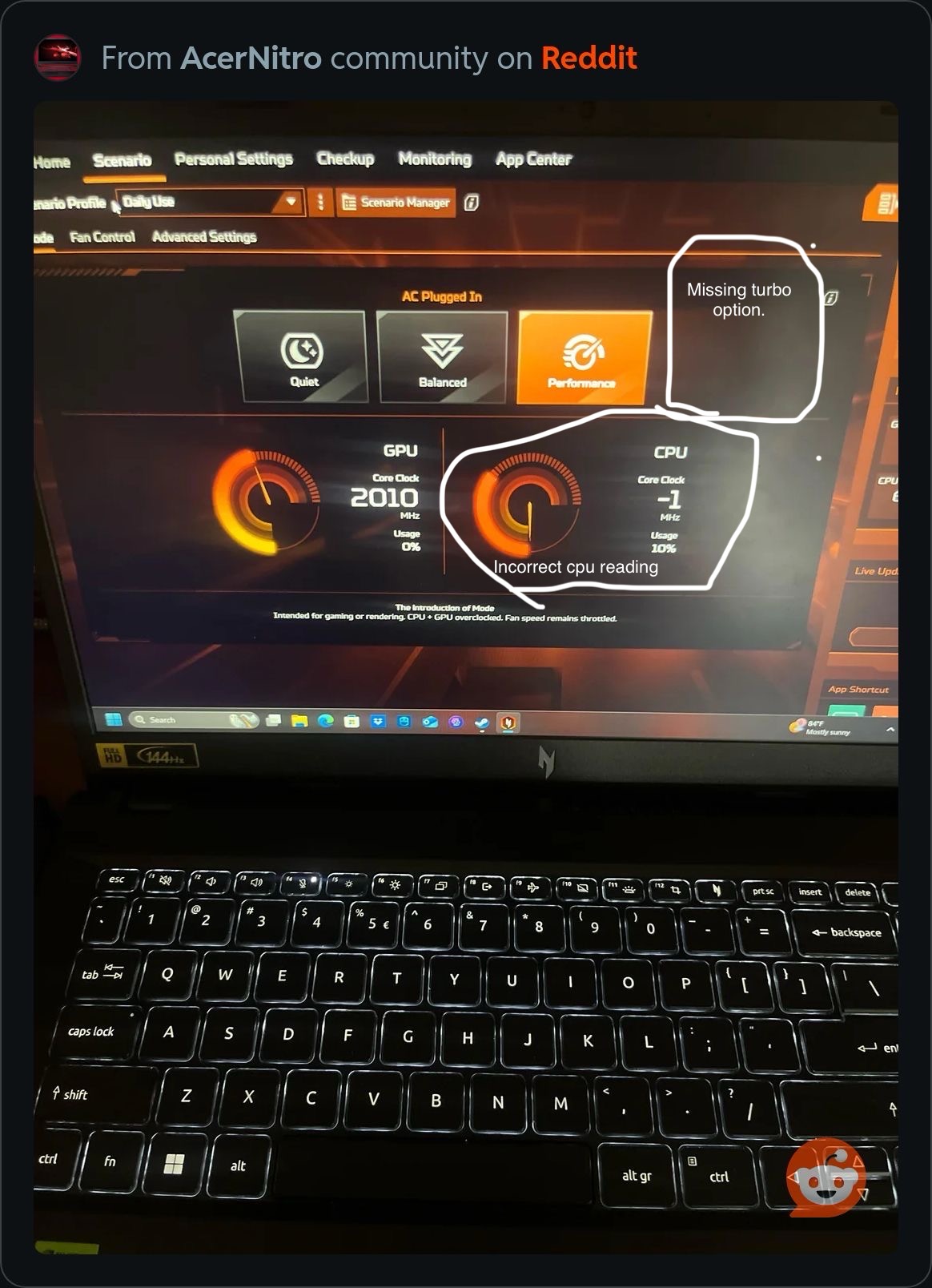
Here in this image, you can see turbo mode missing and my cpu clock speed reading are negative one, I’m at full battery, obviously plugged in since my options for ac only is there ( except turbo of course) and I have best performance set for both power plans in windows settings, best performance for on battery and plugged in. This is a really annoying issue and only the worst out of them all and when it does show up, restarting or shutting off your laptop will remove it and it will randomly or almost never appear again. Reinstalling the app won’t work, and there is really just no fix for this and their shouldn’t be a fix for this because it shouldn’t happen in the first place, it’s a bug that hasn’t been addressed to my knowledge by an acer staff, and it obviously hasn’t been fixed since this a very well known issue with this software, it seems like this only happens to people with this orange version of nitrosense which I was introduced in nitrosense 4.5 or 4.0 and above but I’m not sure. There is also MORE issues with this app, checking for updates also has its own issues when you check for them via nitrosense,
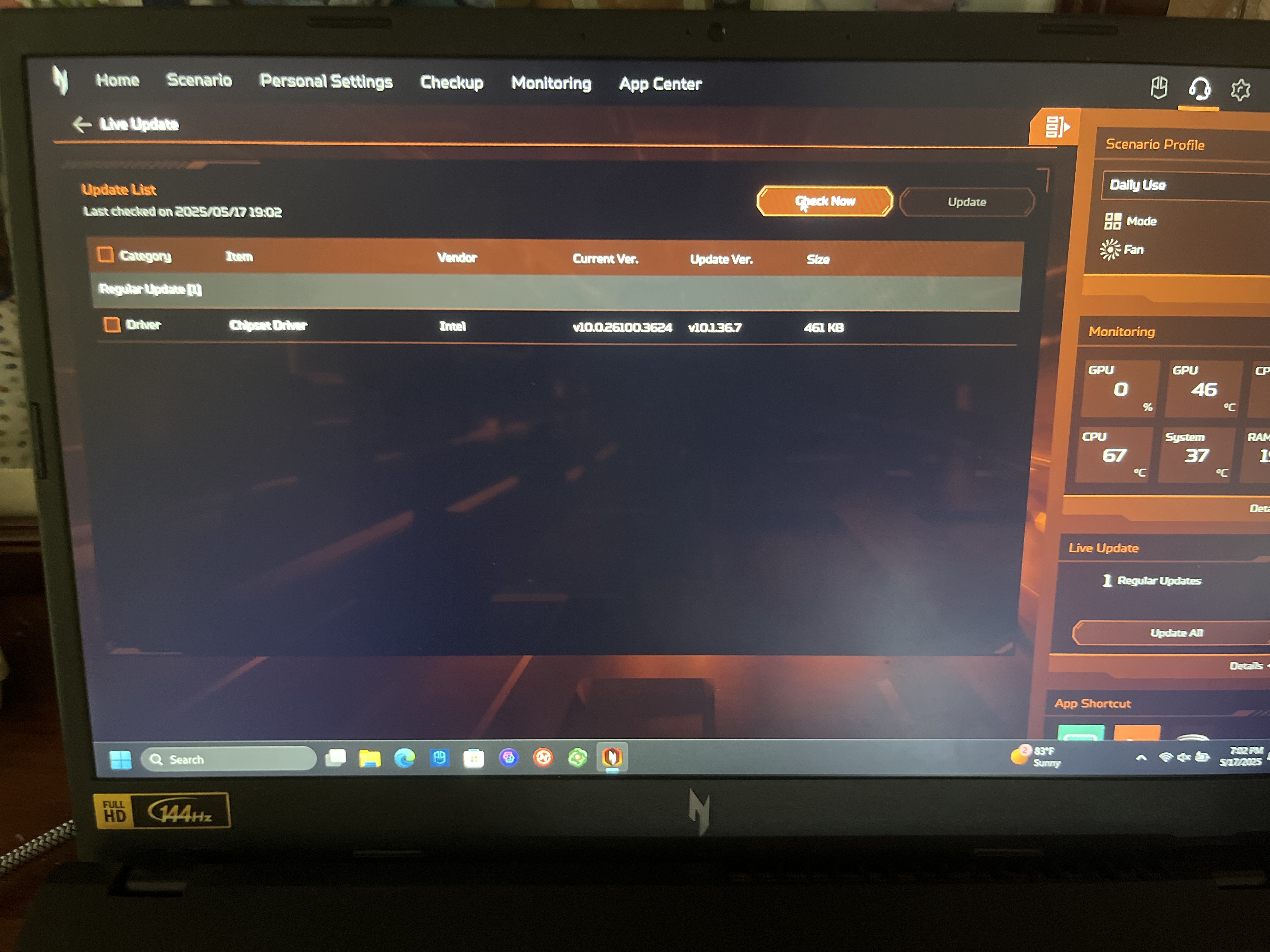
As seen here, I have an update for Intel chipset driver, and trying to install it, doesn’t work, however it instead does this,
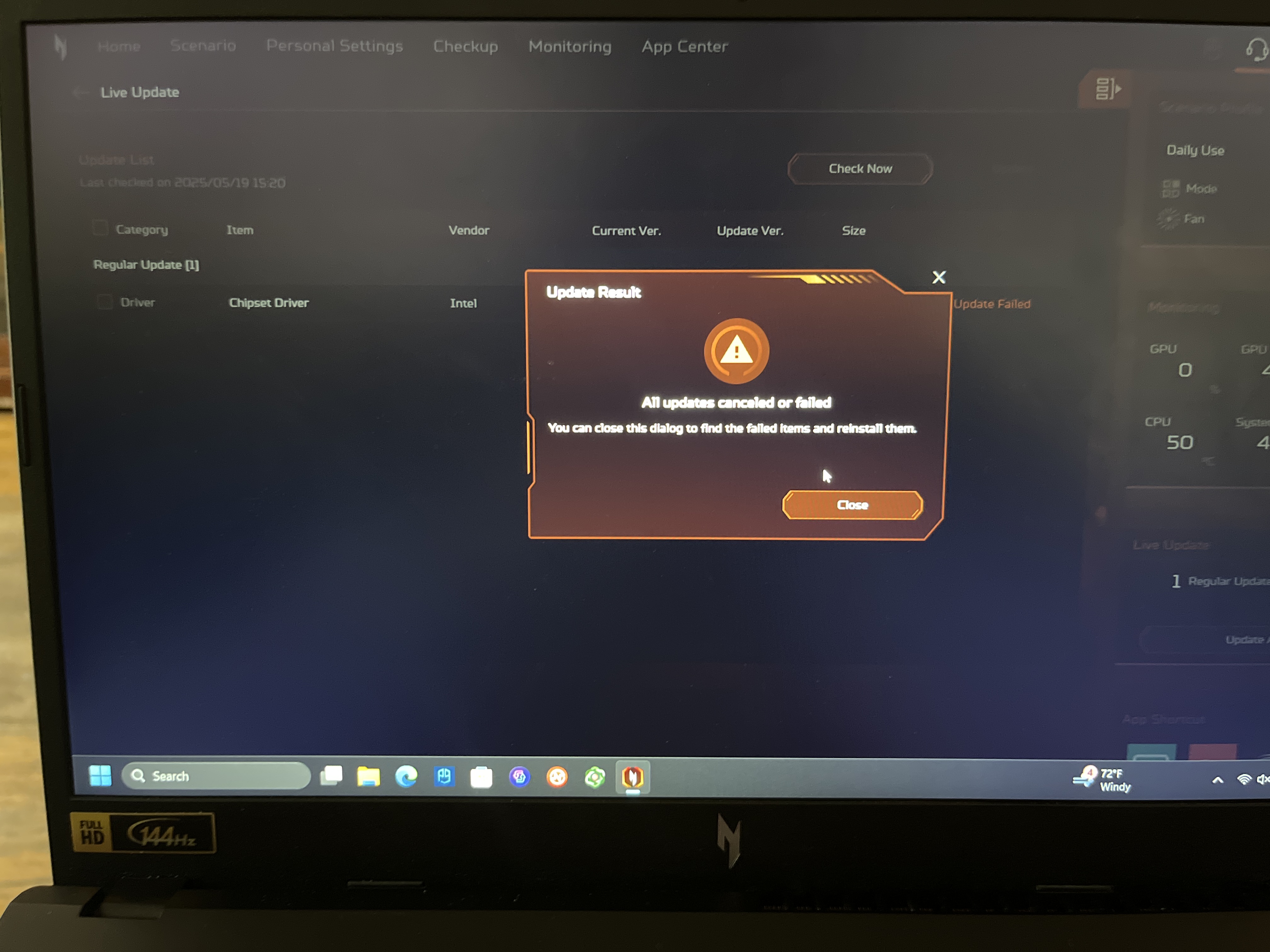
I have all apps closed, yet it never works or installs, I instead had to go to the acer product support page, where all the drivers are and manually download it instead of it being easy as it should be with the app.
Also just to clarify I am on the newest version availabile for my model here is the proof,
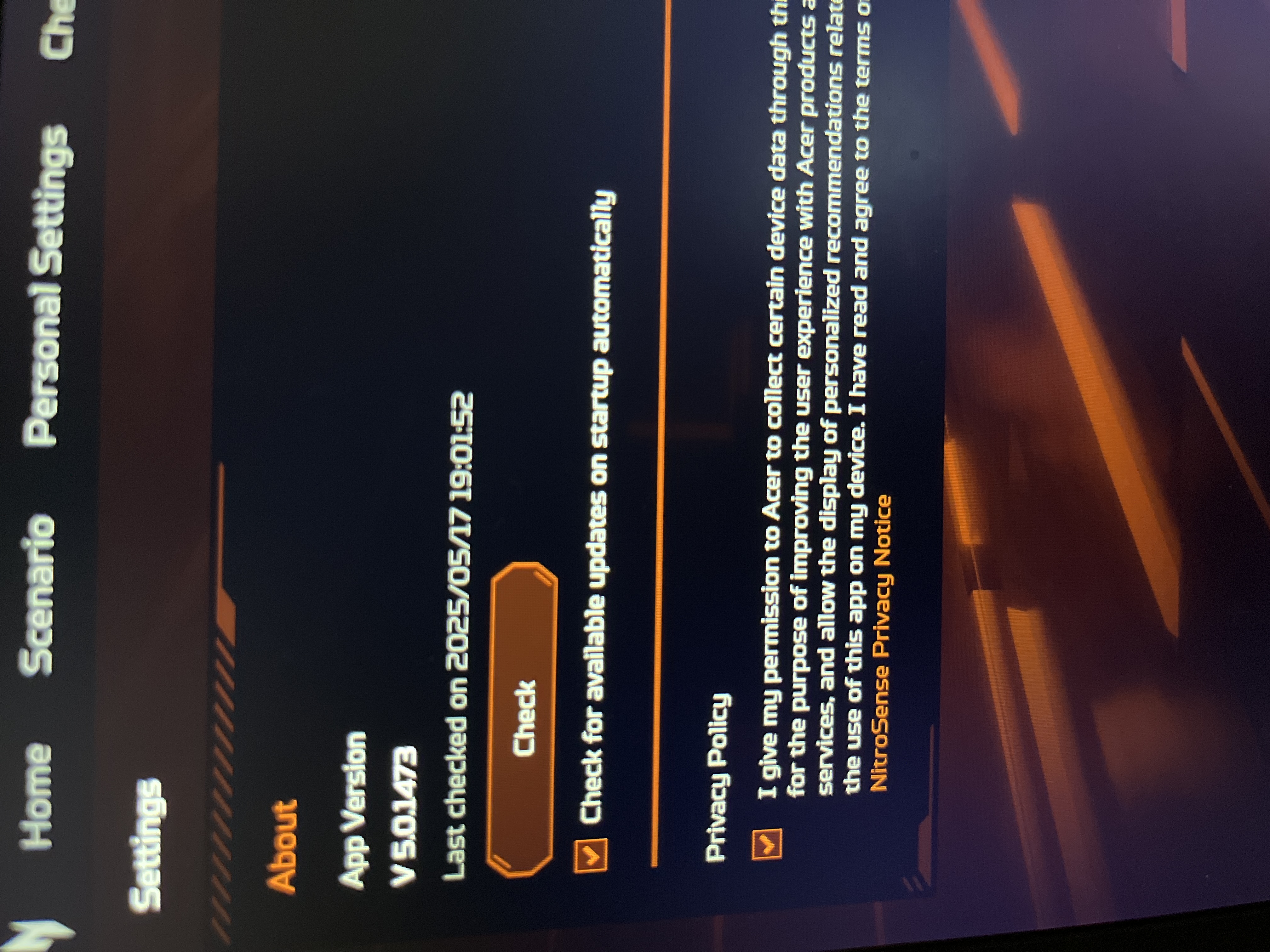
Going back to the turbo mode disappearing bug, I should also clarify that at one point close to when I first got the laptop, this feature was here and I restarted the laptop since I had a windows update, and the feature disappeared and I looked online and people have this same issue and it always happens when the laptop is restarted or powered off. As for the issues that is all but this is clearly and issue and is unacceptable for the customer and makes this app seem a lot more unpolished and not stable. I would really like Acer to fix and address these issues, and I also a really quick feature recommendation for this app, on the anv15-51 and other models of the acer nitro v15, speakers have “DTS X” which without this feature being utilized, really makes the speaker quality not great, now in the DTS X ultra app that comes with the laptop there are many options and all of these will improve audio quality for people’s preferences,
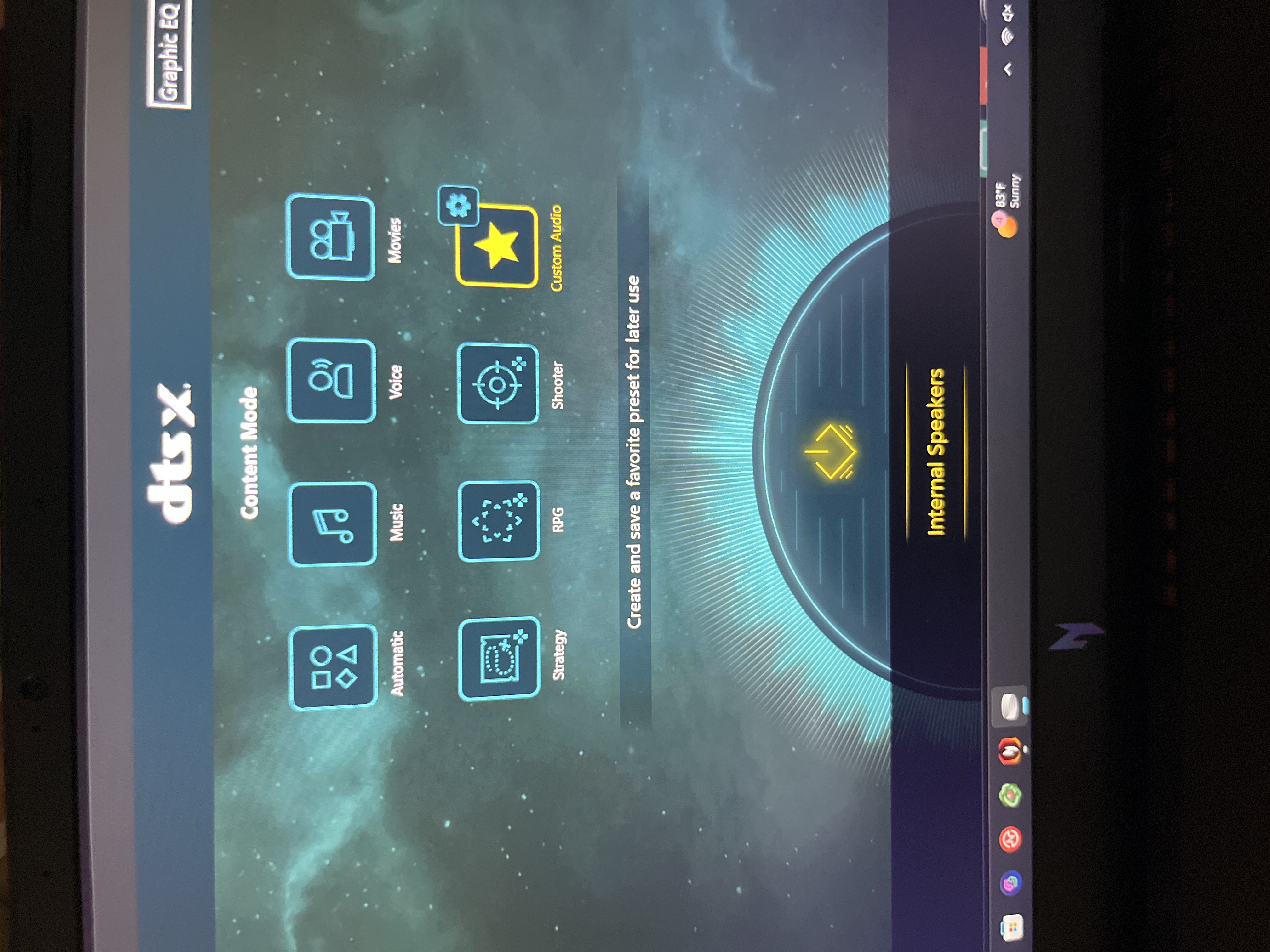
But where DTS X really shines is when you go to the settings of “Custom Audio” option of the app, which shows this,
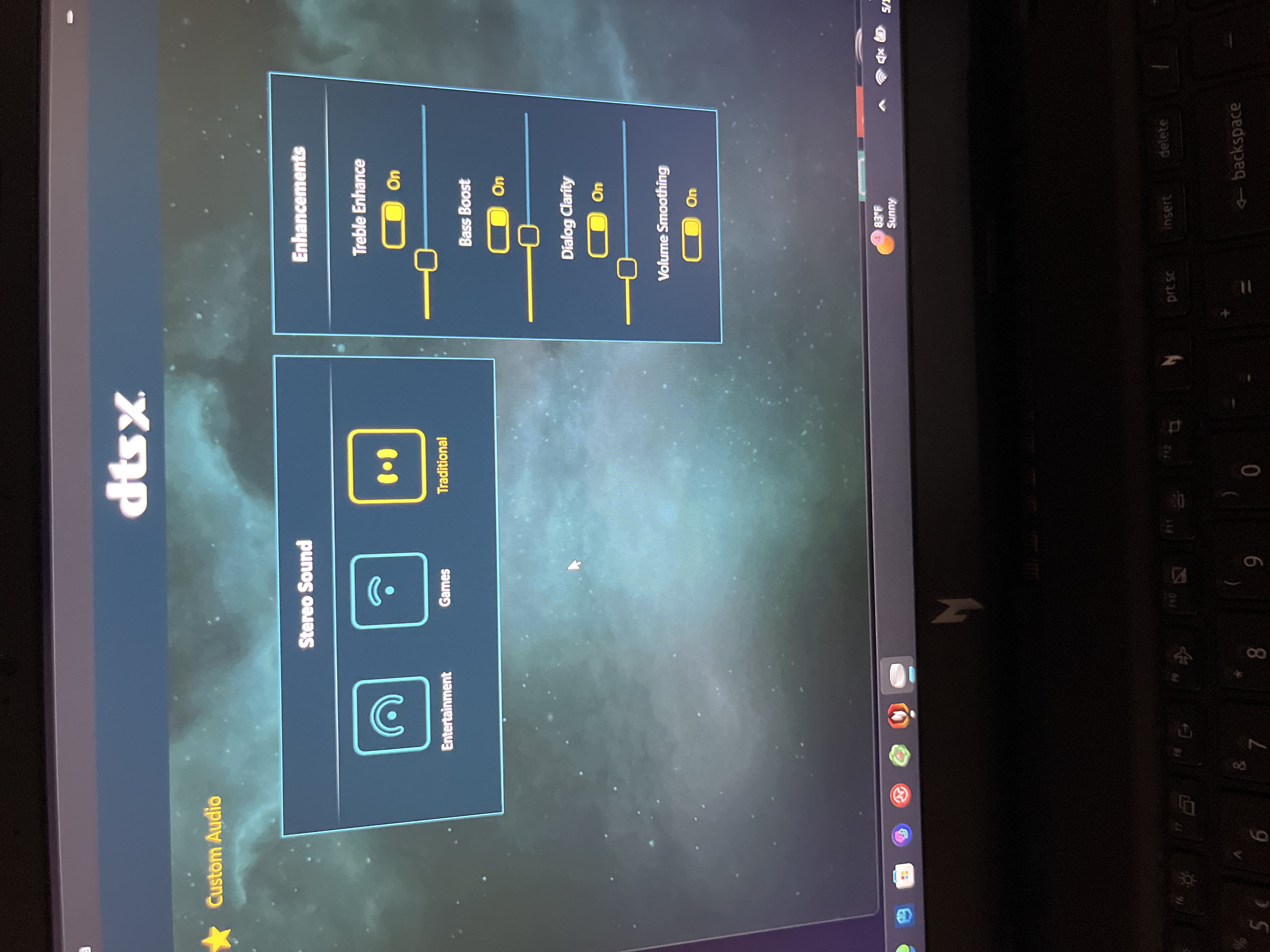
All of those enhancements features greatly improve audio quality and those stereo sound option are also great for what they say they are meant to be used for, so games obviously sound best when selecting the “games” option entertainment most likely for media, and etc. but in the nitrosense app all these options are here but the settings icon next to “custom audio” is not
All of those enhancements features greatly improve audio quality and those stereo sound option are also great for what they say they are meant to be used for, so games obviously sound best when selecting the “games” option entertainment most likely for media, and etc. but in the nitrosense app all these options are here but the settings icon next to “custom audio” is not there,
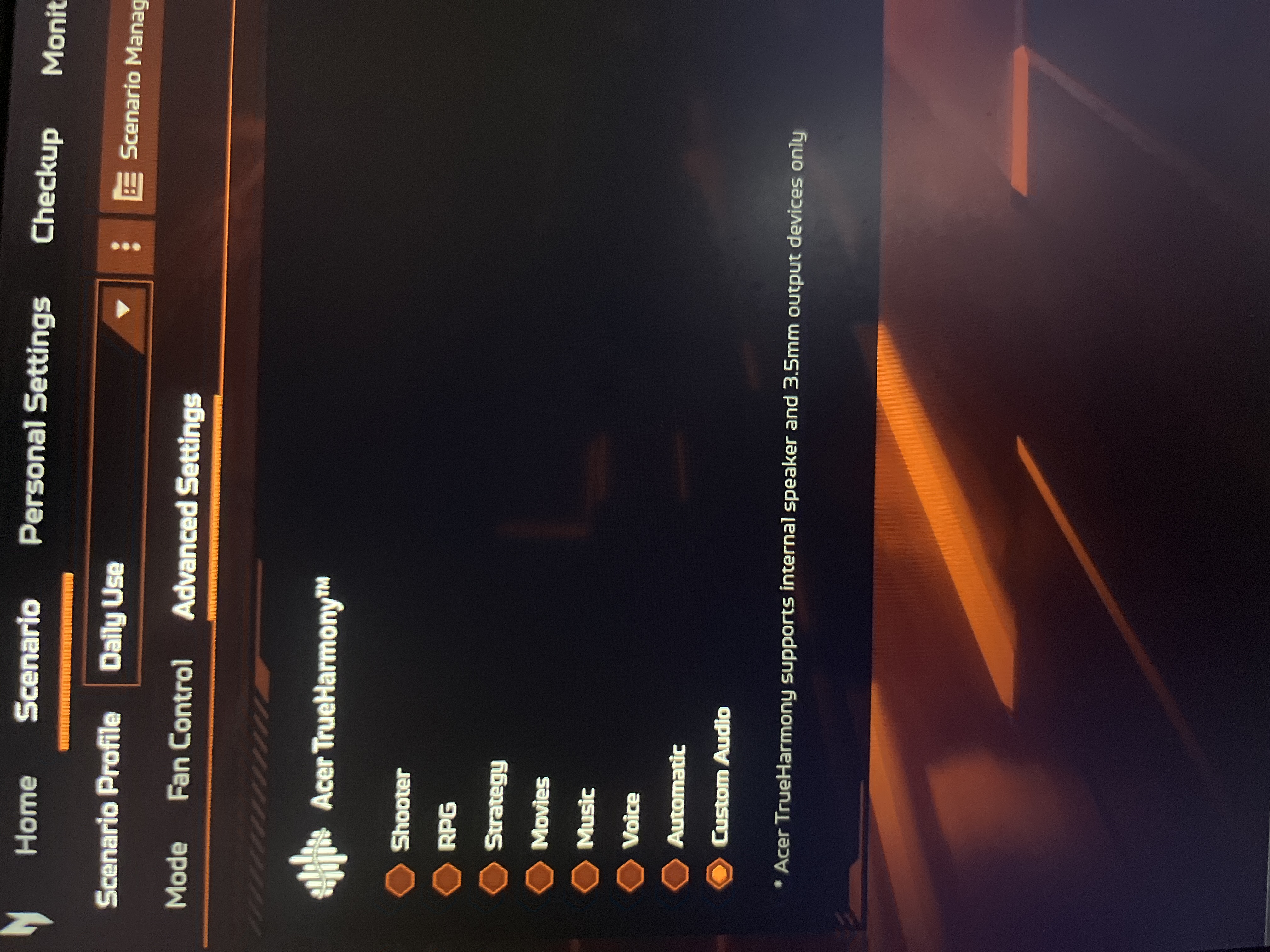
So you must open a the separate app to locate those settings under “custom audio “ this isn’t really an issue but it would be convenient to see this built in nitrosense. That is all I have to say, I really hope this petition gets signed enough for Acer to address this and see it, please spread this on Acer forums, acer sub reddits, etc. hopefully those issues which are the main concern can get fixed. Also as for why the first image says it’s from acer nitro community on Reddit is because that image is from my post that I posted on Reddit. All the other images I just took now and all these issues are still prevalent, if these issues get fixed I’d also like for Acer to add that settings sub section to the custom audio for DTS X but if that doesn’t happen that’s fine, the bugs are the issue. Anyways please spread this and if Acer sees this, please address and fix these issues.
UPDATE: (5/18/25) Thank you for all the support and petitions signed so far, please spread this to where ever will benefit this petition and will reach acer, but I want to add another issue I have just found right now. I am now having incorrect CPU temperature readings,
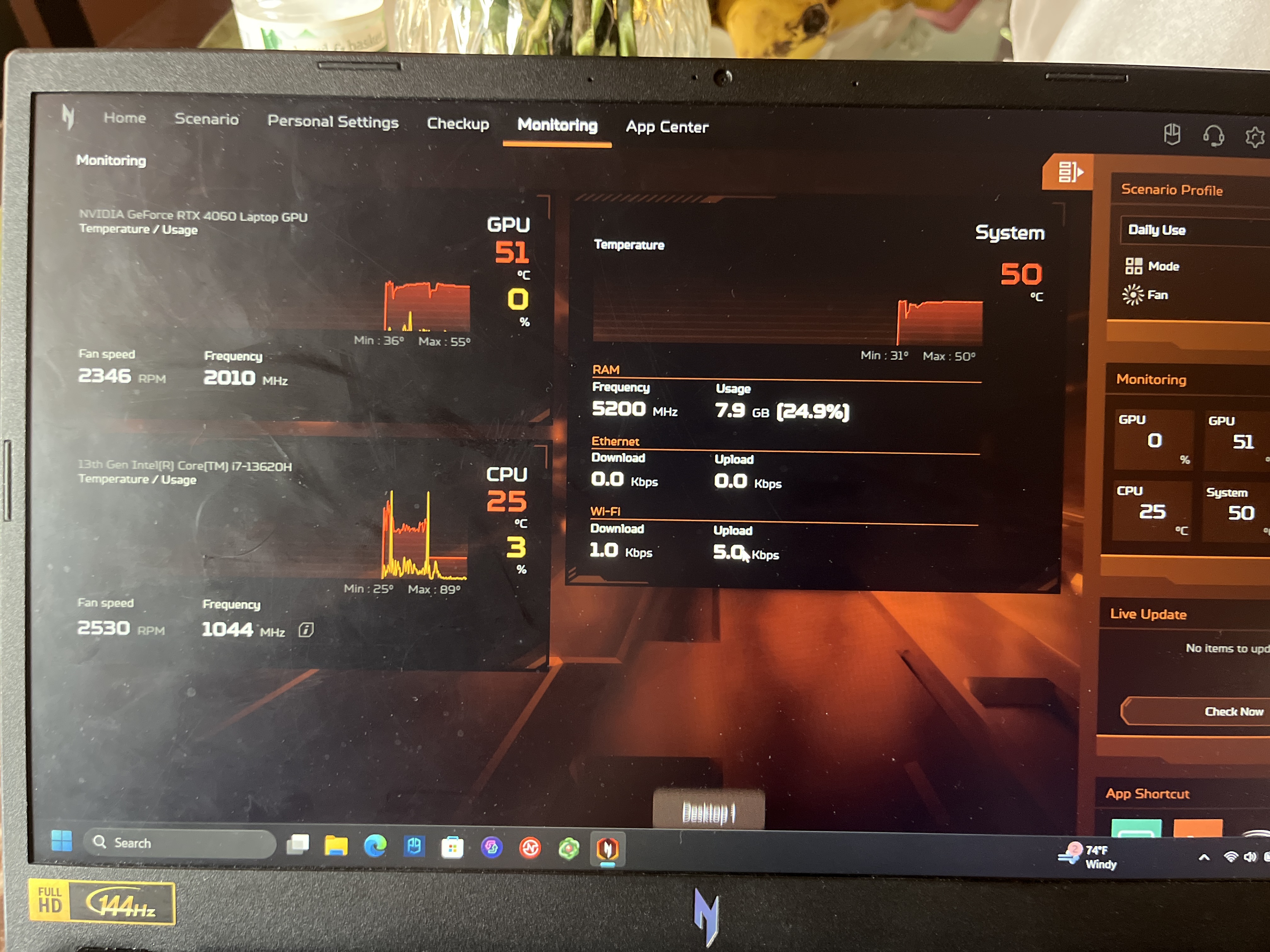
In this image you can see utilization readings for the cpu seem correct but the temperatures are not, I’m on balanced and have been using the laptop for maybe half an hour now and reopening the app won’t help and these cpu temperatures are obviously incorrect and to prove they are, opening HWINFO64 shows that actually cpu temp,
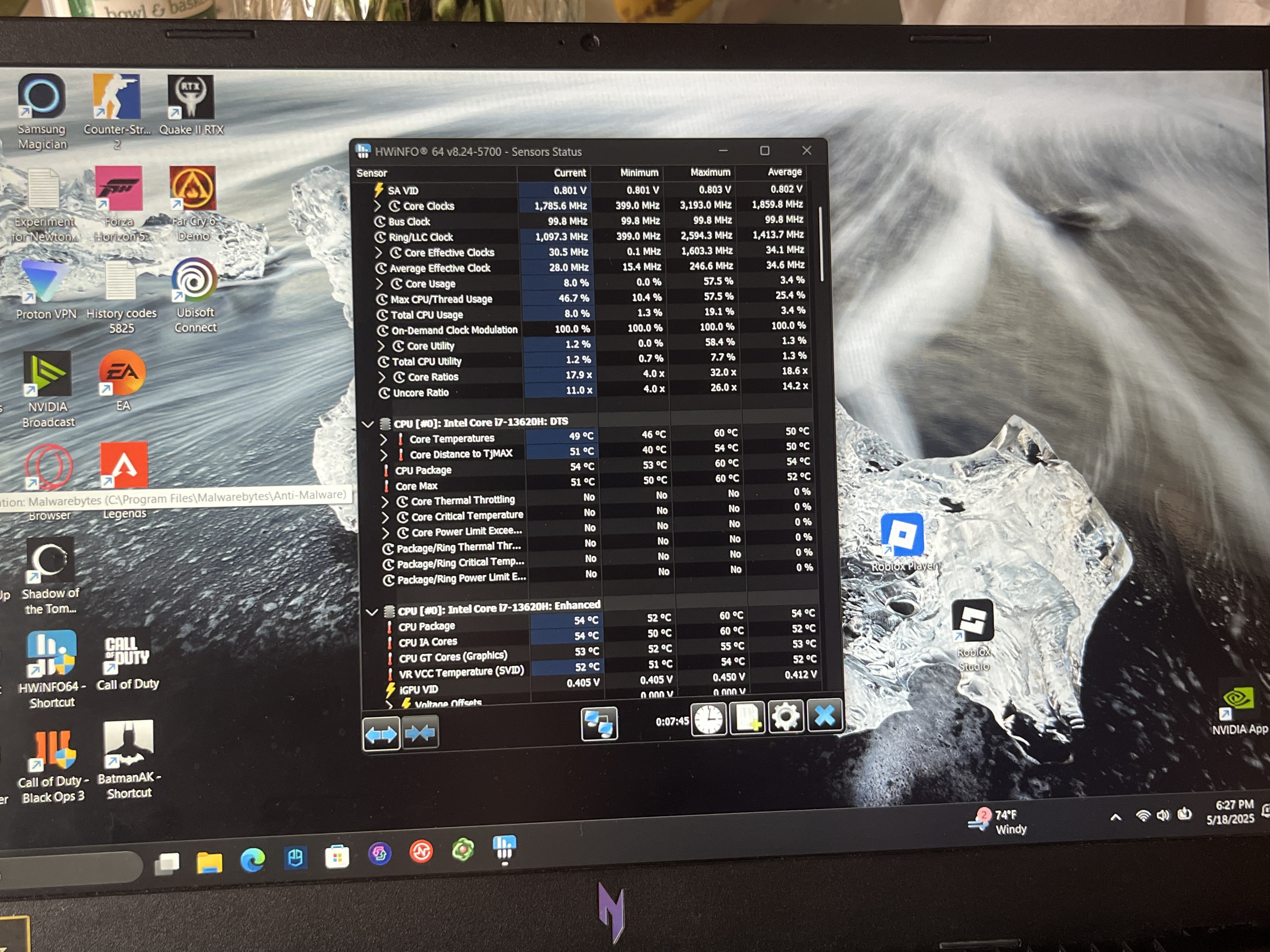
This really makes no sense and unsurprisingly restating the laptop fixes this issue and the actual cpu temps are now showing in nitrosense,
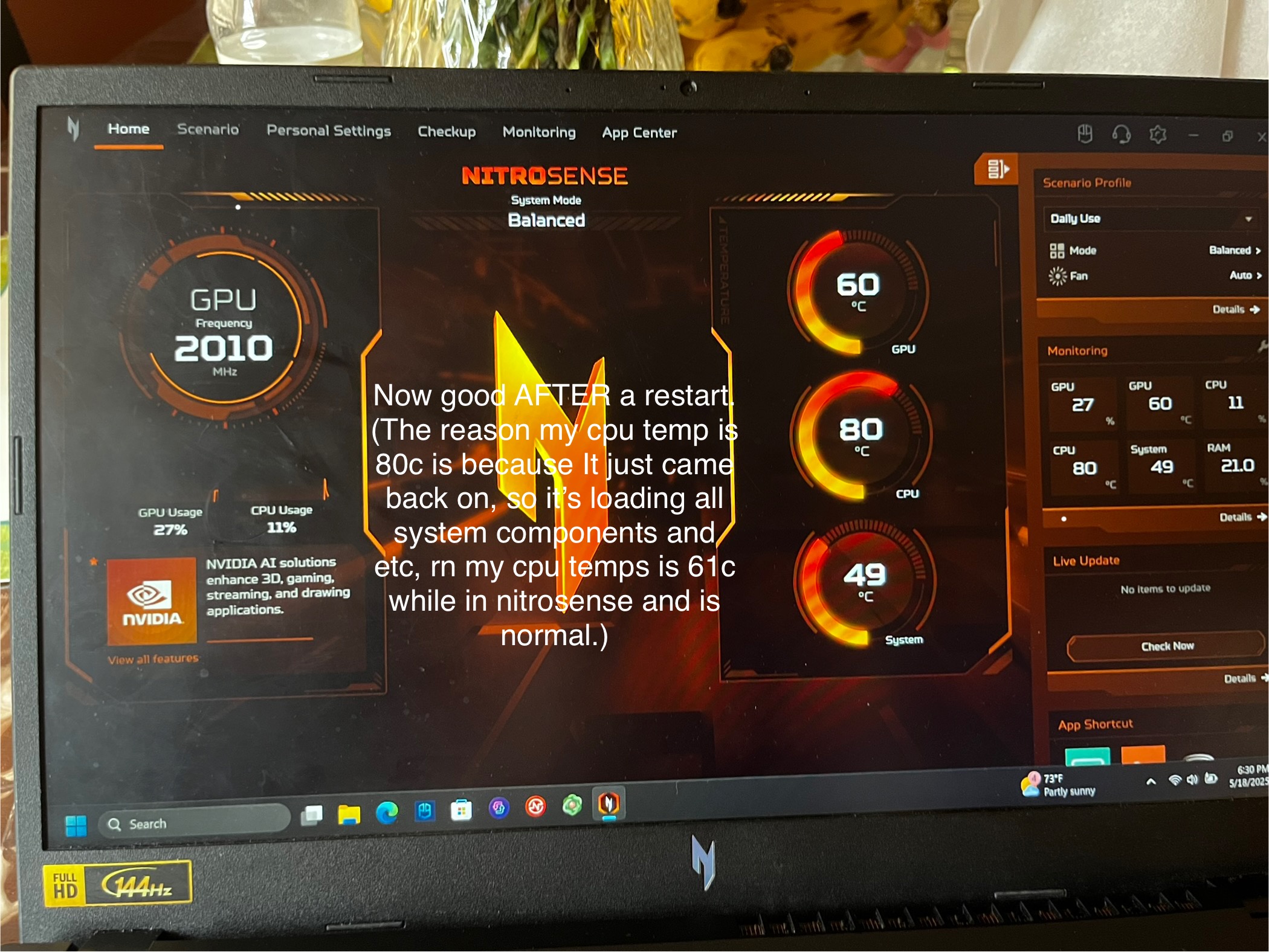
Even though it is temporarily fixed and not happening for now, this once again proves how buggy this app is, I shouldn’t have had to restart my laptop to fix this issue because it shouldn’t be an issue in the first place and these are literally the core components and features of the apps that are having bugs. I’ll update you guys on anymore issues found but this really is just unacceptable.
UPDATE:5/19/25 So as you probably remember, I mentioned here that updates via nitrosense don’t work, and that is true but I’d like to apologize because I was wrong about it being because of it giving me an update that’s older than my current version, it is a newer one but I’m guessing either the laptop came with the update installed or nitrosense is just not installing the update correctly, either way this is definitely a bug because after manually downloading it from acer’s product support page it still shows me this,
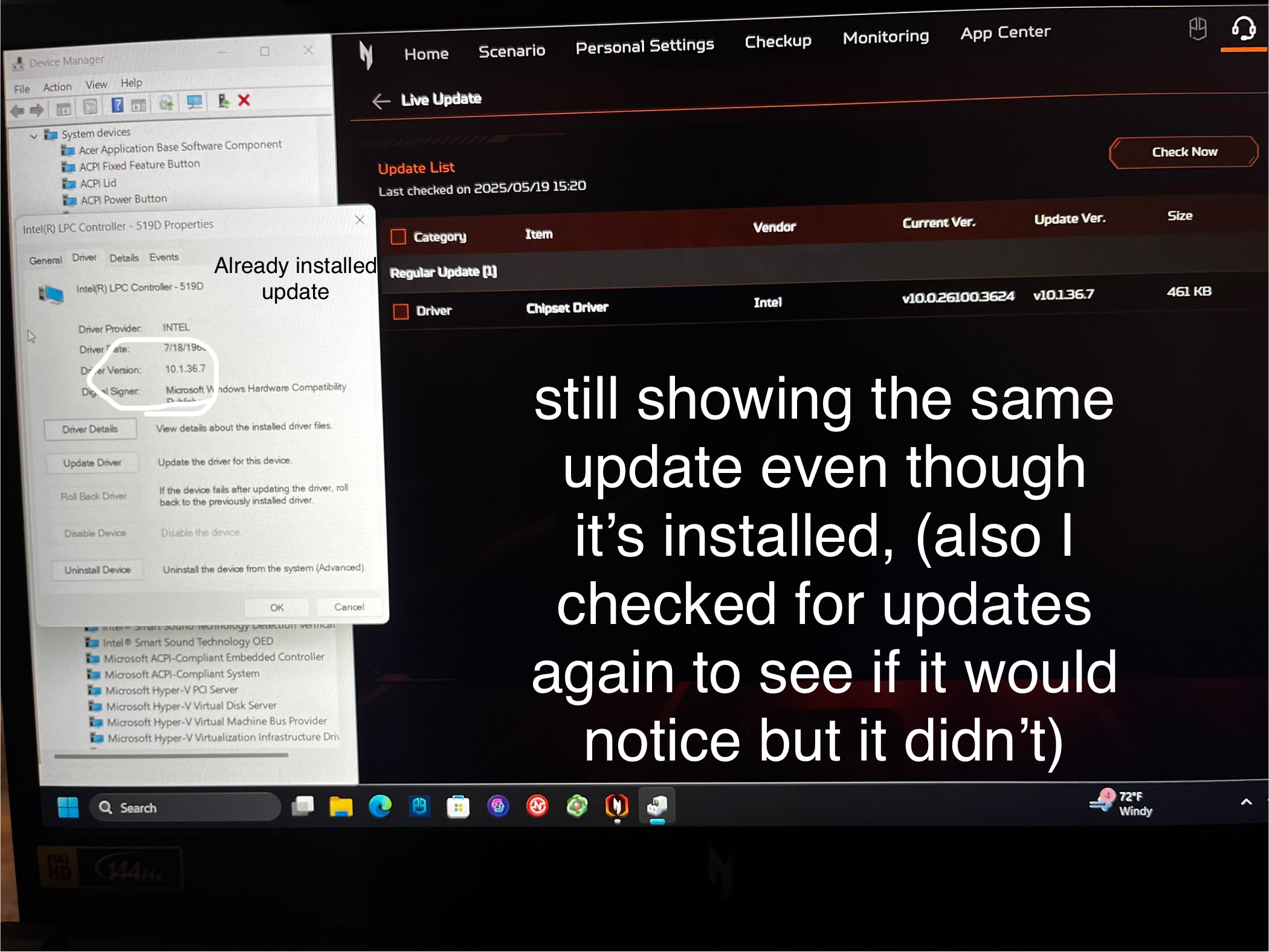
So sorry for the false reason but this is obviously not false this time. I’ve also been seeing that this happens to predator and acer sense users but I’d need more people to confirm that for me. Also I did revise that update section since the reason behind it was wrong but now I can tell you that the update section is completely good now. And nitrosense STILL has isssues with updating just not for the reason that I thought but either way this needs to be addressed and fixed. That’s about it.
UPDATE 5/28/25 - I have encountered the same issue with turbo reappearing and disappearing again, while at school, my nitrosense was bugged and still thought that I was on battery power, therefore only giving me the two options (balanced and eco) even though I was plugged in, so I went to apps in windows settings and repaired it which fixed it but also to my surprised brought back the turbo option which I was very excited to see,
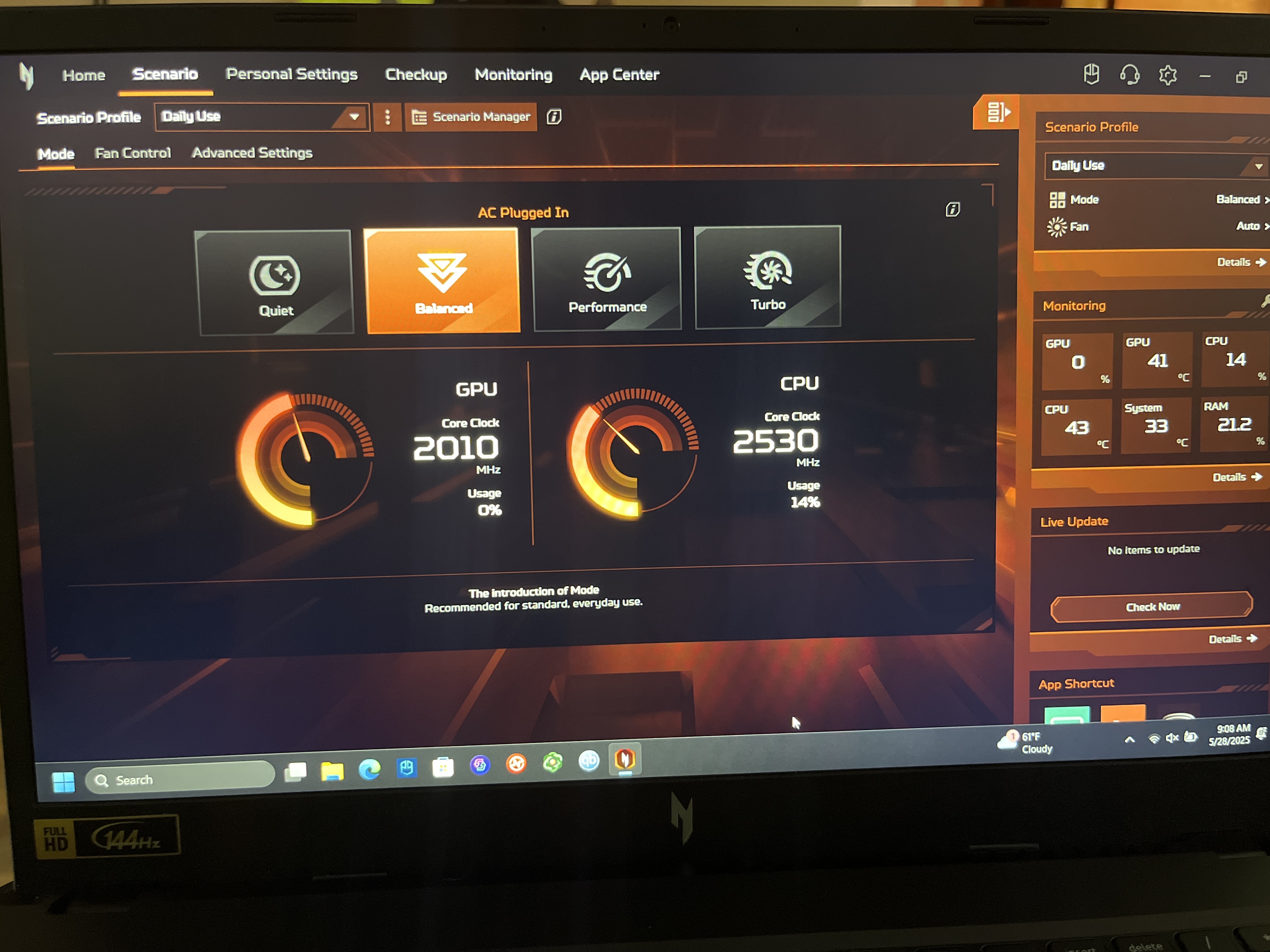
As you can see in this screenshot, it was 9:08 AM and is the same date as today and turbo is there and was working, I didn’t have it selected in the screenshot but I was able to use it and it worked as expected, to make sure I didn’t lose it again I kept hibernating the laptop instead of shutting it off, and somewhere around 12, I decided to close the lid, which puts it in sleep mode (let me clarify that I hibernated it after my class ended, which was at 9:55, and waking it up from hibernation worked just fine and turbo was still there) after reopening the lid, I unfortunately lost the option was again and as of now it is gone once again, I also noticed that in the “Fan Control” section in NitroSense the bottom half of the layout was missing which was very annoying and re-repairing the app did work but still didn’t make sense since that’s never happened to me before and I literally couldn’t adjust fan speeds or view their RPM, I can see their RPM in the “Monitoring” section but can’t adjust it.
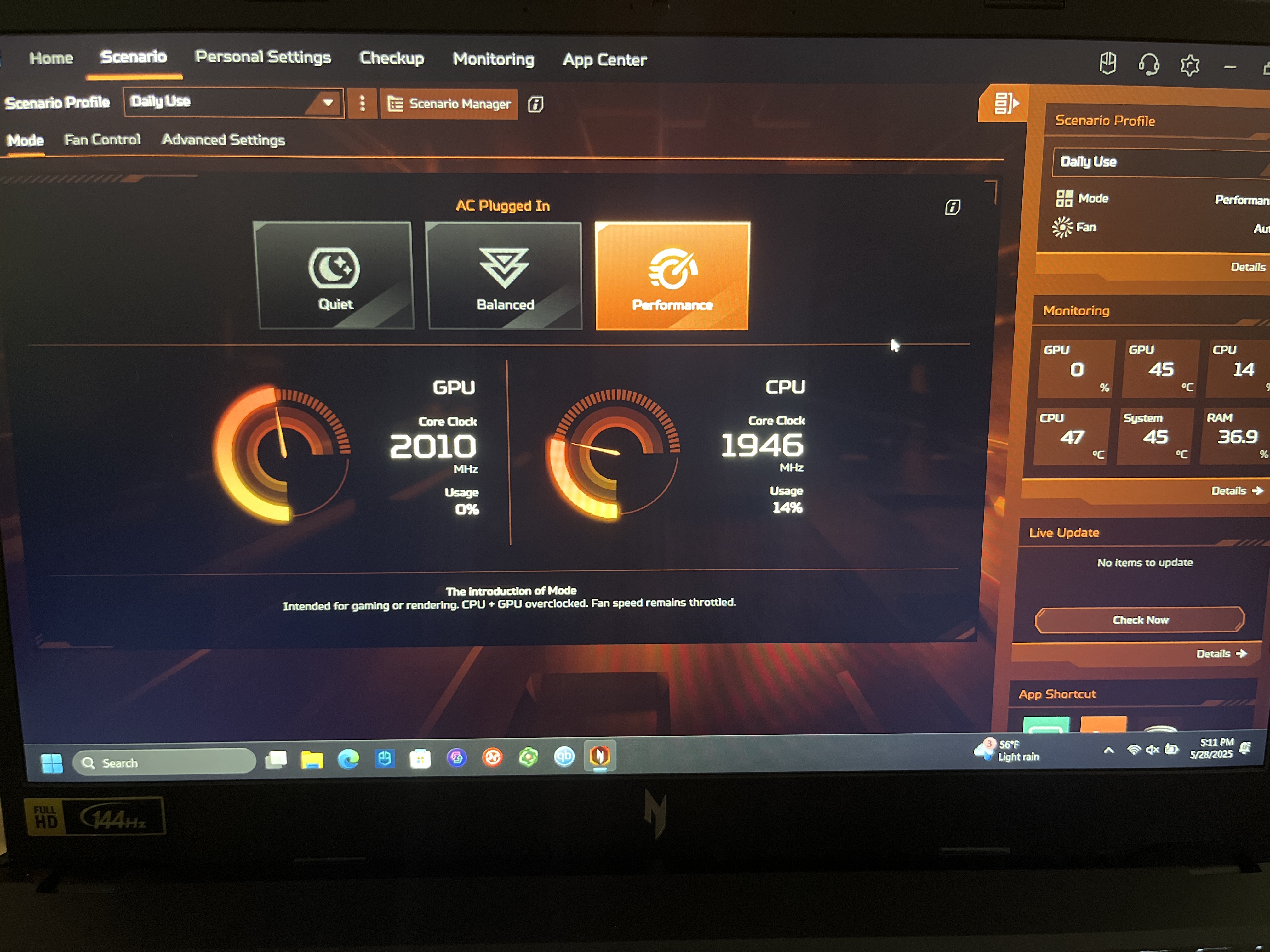
So, as you can see here it is missing once again, this is such an annoying bug and once again a literal feature of the laptop keeps disappearing, this also disproves what some people have said, which was that nitro v15 doesn’t support turbo but it does since I was able to use it temporarily and some people literally just have the ability to use turbo without issues but that is rare and yet, they have the nitro v15. This app has way too many issues and it’s so annoying when you think an issue has resolved itself but comes back. That’s all I have to say for today and also thanks for all the support that we’ve received so far, I’m going to continue sharing this and updating people across communities on Reddit, and I want to start sharing this to acer forums as well but I’m going to first focus on subreddits where I’ve gotten most support from, specifically r/AcerNitro

30
The Issue
On my acer nitro v15, model number - Anv15-51, which I got about 2 months ago now has been working fine, but what has been really annoying with this laptop is a big feature of it, “Nitrosense”, I am on the latest version of this app availed for my model and there is just issues with the app that cannot be ignored. First of all, turbo mode is completely missing from the app, it shows up randomly and this a almost the case for all nitro users, meaning a literal feature of the laptop is unavailable due to this bug,
Here in this image, you can see turbo mode missing and my cpu clock speed reading are negative one, I’m at full battery, obviously plugged in since my options for ac only is there ( except turbo of course) and I have best performance set for both power plans in windows settings, best performance for on battery and plugged in. This is a really annoying issue and only the worst out of them all and when it does show up, restarting or shutting off your laptop will remove it and it will randomly or almost never appear again. Reinstalling the app won’t work, and there is really just no fix for this and their shouldn’t be a fix for this because it shouldn’t happen in the first place, it’s a bug that hasn’t been addressed to my knowledge by an acer staff, and it obviously hasn’t been fixed since this a very well known issue with this software, it seems like this only happens to people with this orange version of nitrosense which I was introduced in nitrosense 4.5 or 4.0 and above but I’m not sure. There is also MORE issues with this app, checking for updates also has its own issues when you check for them via nitrosense,
As seen here, I have an update for Intel chipset driver, and trying to install it, doesn’t work, however it instead does this,
I have all apps closed, yet it never works or installs, I instead had to go to the acer product support page, where all the drivers are and manually download it instead of it being easy as it should be with the app.
Also just to clarify I am on the newest version availabile for my model here is the proof,
Going back to the turbo mode disappearing bug, I should also clarify that at one point close to when I first got the laptop, this feature was here and I restarted the laptop since I had a windows update, and the feature disappeared and I looked online and people have this same issue and it always happens when the laptop is restarted or powered off. As for the issues that is all but this is clearly and issue and is unacceptable for the customer and makes this app seem a lot more unpolished and not stable. I would really like Acer to fix and address these issues, and I also a really quick feature recommendation for this app, on the anv15-51 and other models of the acer nitro v15, speakers have “DTS X” which without this feature being utilized, really makes the speaker quality not great, now in the DTS X ultra app that comes with the laptop there are many options and all of these will improve audio quality for people’s preferences,
But where DTS X really shines is when you go to the settings of “Custom Audio” option of the app, which shows this,
All of those enhancements features greatly improve audio quality and those stereo sound option are also great for what they say they are meant to be used for, so games obviously sound best when selecting the “games” option entertainment most likely for media, and etc. but in the nitrosense app all these options are here but the settings icon next to “custom audio” is not
All of those enhancements features greatly improve audio quality and those stereo sound option are also great for what they say they are meant to be used for, so games obviously sound best when selecting the “games” option entertainment most likely for media, and etc. but in the nitrosense app all these options are here but the settings icon next to “custom audio” is not there,
So you must open a the separate app to locate those settings under “custom audio “ this isn’t really an issue but it would be convenient to see this built in nitrosense. That is all I have to say, I really hope this petition gets signed enough for Acer to address this and see it, please spread this on Acer forums, acer sub reddits, etc. hopefully those issues which are the main concern can get fixed. Also as for why the first image says it’s from acer nitro community on Reddit is because that image is from my post that I posted on Reddit. All the other images I just took now and all these issues are still prevalent, if these issues get fixed I’d also like for Acer to add that settings sub section to the custom audio for DTS X but if that doesn’t happen that’s fine, the bugs are the issue. Anyways please spread this and if Acer sees this, please address and fix these issues.
UPDATE: (5/18/25) Thank you for all the support and petitions signed so far, please spread this to where ever will benefit this petition and will reach acer, but I want to add another issue I have just found right now. I am now having incorrect CPU temperature readings,
In this image you can see utilization readings for the cpu seem correct but the temperatures are not, I’m on balanced and have been using the laptop for maybe half an hour now and reopening the app won’t help and these cpu temperatures are obviously incorrect and to prove they are, opening HWINFO64 shows that actually cpu temp,
This really makes no sense and unsurprisingly restating the laptop fixes this issue and the actual cpu temps are now showing in nitrosense,
Even though it is temporarily fixed and not happening for now, this once again proves how buggy this app is, I shouldn’t have had to restart my laptop to fix this issue because it shouldn’t be an issue in the first place and these are literally the core components and features of the apps that are having bugs. I’ll update you guys on anymore issues found but this really is just unacceptable.
UPDATE:5/19/25 So as you probably remember, I mentioned here that updates via nitrosense don’t work, and that is true but I’d like to apologize because I was wrong about it being because of it giving me an update that’s older than my current version, it is a newer one but I’m guessing either the laptop came with the update installed or nitrosense is just not installing the update correctly, either way this is definitely a bug because after manually downloading it from acer’s product support page it still shows me this,
So sorry for the false reason but this is obviously not false this time. I’ve also been seeing that this happens to predator and acer sense users but I’d need more people to confirm that for me. Also I did revise that update section since the reason behind it was wrong but now I can tell you that the update section is completely good now. And nitrosense STILL has isssues with updating just not for the reason that I thought but either way this needs to be addressed and fixed. That’s about it.
UPDATE 5/28/25 - I have encountered the same issue with turbo reappearing and disappearing again, while at school, my nitrosense was bugged and still thought that I was on battery power, therefore only giving me the two options (balanced and eco) even though I was plugged in, so I went to apps in windows settings and repaired it which fixed it but also to my surprised brought back the turbo option which I was very excited to see,
As you can see in this screenshot, it was 9:08 AM and is the same date as today and turbo is there and was working, I didn’t have it selected in the screenshot but I was able to use it and it worked as expected, to make sure I didn’t lose it again I kept hibernating the laptop instead of shutting it off, and somewhere around 12, I decided to close the lid, which puts it in sleep mode (let me clarify that I hibernated it after my class ended, which was at 9:55, and waking it up from hibernation worked just fine and turbo was still there) after reopening the lid, I unfortunately lost the option was again and as of now it is gone once again, I also noticed that in the “Fan Control” section in NitroSense the bottom half of the layout was missing which was very annoying and re-repairing the app did work but still didn’t make sense since that’s never happened to me before and I literally couldn’t adjust fan speeds or view their RPM, I can see their RPM in the “Monitoring” section but can’t adjust it.
So, as you can see here it is missing once again, this is such an annoying bug and once again a literal feature of the laptop keeps disappearing, this also disproves what some people have said, which was that nitro v15 doesn’t support turbo but it does since I was able to use it temporarily and some people literally just have the ability to use turbo without issues but that is rare and yet, they have the nitro v15. This app has way too many issues and it’s so annoying when you think an issue has resolved itself but comes back. That’s all I have to say for today and also thanks for all the support that we’ve received so far, I’m going to continue sharing this and updating people across communities on Reddit, and I want to start sharing this to acer forums as well but I’m going to first focus on subreddits where I’ve gotten most support from, specifically r/AcerNitro
The Decision Makers
Petition Updates
Share this petition
Petition created on May 17, 2025